API Objects
Pods
Pods are the smallest deployable unit in K8s. They are a “logical” grouping that encapsulates containers that are to be managed via Kubernetes.
Pods can contain one container (standard use case) or multiple ones that are somehow bundled together (e.g sidecar containers). All containers in the pod share:
- Network (can reach each other with
localhost) - Storage
- Host (co-located)
- Schedule (lifecycles are tied to one another)
In general, pods are thought to be volatile and replaceable. Each instance of a pod represents an instance of an app that can be scaled up/down at any point.
YAML Definition
Like every other K8s element, a pod can be created using kubectl, but the recommended way to do it is using a YAML definition. The same fields are common to all elements: apiVersion, kind, metadata and spec. In the case of a pod, here is a short example
apiVersion: v1 # For pods is always v1
kind: Pod
metadata:
  name: nginx-pod # Name of the pod, only valid if created standalone
  labels: # KV pairs that can be used to separate pods from each other
    app: nginx
spec:
  containers:
    - name: nginx-container
      image: nginx # Image to pull from docker registry (or private one)
ReplicaSet
ReplicaSets are kubernetes objects used to maintain a stable set of replicated pods running within a cluster at any given time. Different instances of a pod are called replicas and this objects manage them so that a desired number of them are running at all times (can also be 1 or 0)
Legacy k8s used
ReplicationControllerobjects for this purpose. This has been deprecated in favor ofReplicaSetand its use is not recommended
A ReplicaSet has three main features: a matcher to detect which pods to manage, a pod template for creating new pods whenever existing ones fail, and a replica count for maintaining the desired number of replicas that the controller is supposed to keep running. A ReplicaSet also works to ensure additional pods are scaled down or deleted whenever an instance with the same label is created.
Finally, these controllers can be used with existing pods (created before the replica set). In this case, matching pods will be counted towards the replica count.
YAML Definition
apiVersion: apps/v1
kind: ReplicaSet
metadata:
  name: myapp-rs
  labels:
    app: nginx
spec:
  selector: # How to find which pods to manage?
    matchLabels: # Using the pod labels
      app: nginx
  replicas: 4 # 4 Instances must be running at all times (including existing ones)
  template: # Under here, a normal YAML definition for a pod is used
    metadata:
      name: nginx-pod # Does not matter much, pod names will start with the replica set name
      labels:
        app: nginx # Make sure label matches the matcher
    spec:
      containers:
        - name: nginx-container
          image: nginx
Deployment
Deployments are kubernetes abstract elements that provides a way to manage updates for Pod and ReplicaSet elements
These elements encapsulate (are a level higher) the other two, and allows to control updates in scenarios like:
- New image version
- Scale up / down
- Rollout deployments
- Rollback
It creates and manages ReplicaSet elements underneath to manage the pods. When rolling out/back, new ones are created to pass pods following a given strategy.
To apply updates, deployments use the concept of a rollout. These represent a new revision (version) of a deployment in which something changed (see above). Creating or modifying a deployment creates a rollout.
The rollout can follow one of two strategies:
Recreate: Destroy all old pods, and then spin all the new ones. This approach leads to having downtime in this periodRollingUpdate: This is the default strategy. Destroy one old pod (or more) and bring up a new one. Repeat. This approach has no downtimes as the application (either in the old or new version) will always be available. For fine tuning, the parametersmaxUnavailableandmaxSurge(maximum number of Pods that can be created over the desired number of Pods) can be used.
YAML Definition
Definition is similar to a replica set, but with kind: Deployment
apiVersion: apps/v1
kind: Deployment
metadata:
  name: http-frontend
spec:
  strategy:
    type: RollingUpdate
    rollingUpdate:
      maxUnavailable: 25%
      maxSurge: 25%
  replicas: 3
  selector:
    matchLabels:
      tier: frontend
  template:
    metadata:
      name: http-frontend-pod # Does not matter much, pods will have the name of the deployment as prefix
      labels:
        tier: frontend
    spec:
      containers:
        - name: http-frontend-cont
          image: httpd:2.4-alpine
DaemonSet
DaemonSet are kubernetes objects, similar to ReplicaSet, that ensures that a pod is run in all (or certain) pods in a cluster. This includes any potential new nodes, that will be given an instance of the pod automatically when joining the cluster.
These type of objects are generally used for:
- Monitoring services
- Networking components (e.g
kube-proxy) - Other uses
Under the hood, these objects make use of Node Affinity to create a pod for each of the nodes and interact with the scheduler to deploy it.
YAML Definition
apiVersion: apps/v1
kind: DaemonSet
metadata:
  name: monitoring-daemon
spec:
  selector:
    matchLabels:
      app: monitoring-agent #Matches the pod below
  template:
    metadata:
      labels:
        app: monitoring-agent
    spec:
      containers:
        - name: monitoring-agent
          image: monitoring-agent
Services
Services are kubernetes abstractions that help expose groups of Pods over a network. Each Service object defines a logical set of endpoints (usually these endpoints are Pods) along with a policy about how to make those pods accessible.
These (using the underlying plugin-implemented network) allow for communication :
- Between pods in the cluster (backend - frontend for example)
- Using an IP address external to the cluster (IP of the node for example)
They enable a loose coupling between pods, which is necessary as pods and their addresses can constantly change.
Depending on the type of “exposure” desired, there are different types of services that can be created
On creation, all service elements are assigned a cluster-wide unique IP (cluster IP) which can be used to refer to it.
NodePort services
These type of services, expose a port in a pod (or a series of pods) as a port in the host machine. With this, the address of the host machine (external to the kubernetes cluster) can be used to access the application
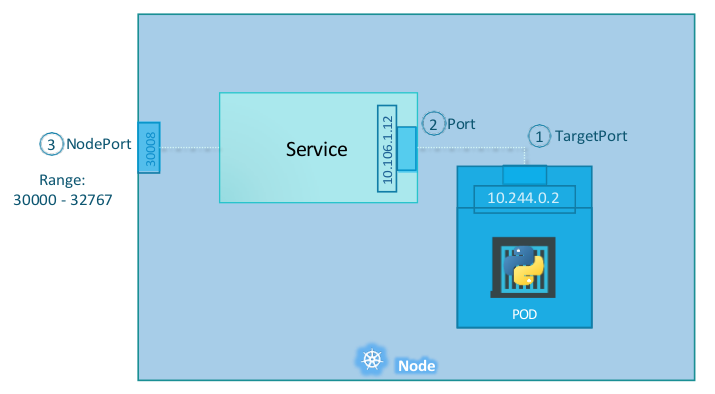
Node ports assigned can range from 30000 to 32767. If no port is defined, a random free one in that range will be used
Pods are selected using a selector field in the definition. If a service is created and matches multiple pods, or pods in multiple hosts, K8s automatically includes them under the service, and they will be reachable using the external IP of any of the nodes (even if not running an instance) in the defined port.
YAML Definition
apiVersion: v1
kind: Service
metadata:
  name: my-service
spec:
  type: NodePort
  ports:
    - protocol: TCP
      targetPort: 80 # If not provided, assumed to be same as port
      port: 80 # Port in which app will be available inside the cluster (cluster ip)
      nodePort: 30008 # If not provided a free port in the range is assigned
  selector:
    label1: value1
ClusterIP services
As seen above, each service gets assigned an internal cluster IP where it will route request from port to targetPod on the pods. This type of service (without linking to external IP) is a ClusterIP service. This is the default type of service in kubernetes and allow inter-pod communication inside the cluster.
Once created, these services provide a single (non volatile) interface that pods can use to find other pods. They can do so by using the cluster IP of the service or its name.
YAML Definition
apiVersion: v1
kind: Service
metadata:
  name: back-end
spec:
  type: ClusterIP
  ports: # No node port is used
    - targetPort: 80
      port: 8080 # This app will be available in <CLUSTER_IP>:8080 and route to port 80 on the pods
  selector:
    label1: value1
LoadBalancer services
This type of service is particular to K8s clusters running in given cloud providers. When defined, K8s will provision a native cloud-provisioner load balancer for the application which can be used to unify the access to a single IP
YAML Definition
apiVersion: v1
kind: Service
metadata:
  name: back-end
spec:
  type: LoadBalancer
  ports:
    - targetPort: 80
      port: 8080
      nodePort: 30008 # If not used in a supported platform, it will act as a NodePort
  selector:
    label1: value1
Namespaces
Namespaces are kubernetes components that allow for isolation of resources in a single cluster. It allows to deploy pods, services and deployments in a logical group that enables easy networking and setting up policies and resource constraints (with ResourceQuota objects ).
Default Namespaces
Kubernets starts by default with 4 namespaces:
default- Kubernetes includes this namespace so that you can start using your new cluster without first creating a namespace.
- Without any configuration is the one that
kubectlaccess.
kube-node-lease- This namespace holds
Leaseobjects associated with each node. Node leases allow thekubeletto send heartbeats so that the control plane can detect node failure.
- This namespace holds
kube-public- This namespace is readable by all clients (including those not authenticated). This namespace is mostly reserved for cluster usage, in case that some resources should be visible and readable publicly throughout the whole cluster.
kube-system- The namespace for objects created by the Kubernetes system
In production environments, the use of the
defaultnamespace is not encouraged
DNS in Namespaces
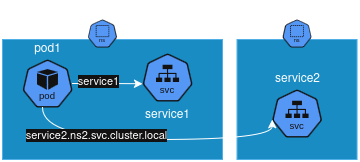
In a namespace, all resources must have an unique name (between namespaces is not mandatory). This enables k8s to create DNS infrastructure that allows pods to reach services by their names. In a inter-namespace context, services can be reached using their FQDN
YAML Definition
apiVersion: v1
kind: Namespace
metadata:
  name: ns1
The
metadata.namespacefield can also be populated in YAML definitions for pods, services and deployments to assign them to a NS directly.
ConfigMap
ConfigMap are k8s objects that abstract configuration from pods, making it possible to centralize configuration which can then be injected into different pods as files, environment variables or arguments.
These objects are used to store non-confidential data in key-value pairs. For delicate information Secrets are preferred.
Once created, pod definitions can reference the objects:
- Mounted as a volume: Each of the keys in
databecomes a file under the mount path - As environment files: Particular env variables can reference the config, or the whole config set can be imported. See here for details
YAML Definition
apiVersion: v1
kind: ConfigMap
metadata:
  name: game-demo
data:
  # property-like keys; each key maps to a simple value
  player_initial_lives: "3"
  # file-like keys
  user-interface.properties: |
    color.good=purple
    color.bad=yellow
    allow.textmode=true
Secrets
A Secret is an object that contains a small amount of sensitive data such as a password, a token, or a key. Is similar to a ConfigMap but more secure. Once again, once created, pod definitions can reference the objects:
- Mounted as a volume: Each of the keys in
databecomes a file under the mount path - As environment files: Particular env variables can reference the secrets. See here for details
Secrets are by default in kubernetes not that secure. They are stored encoded (base64), not encryted, and anyone with access to the cluster can access them. There are measurements that can be taken to reduce the risk (enabling encryption at rest, enabling RBAC rules), but is almost worth to manage secrets with a third party solution like Hashicorp Vault
YAML Definition
apiVersion: v1
kind: Secret
metadata:
  name: app-secret
data:
  DB_Host: bXlzcWw= # Each value is stored base64 encoded
  DB_User: cm9vdA==
  DB_Password: cGFzd3Jk
Persistent Volumes
Persistent Volumes (PV) are cluster-wide resources representing real storage, whether cloud-based, network-attached, or local disks.
The accessModes specify how the volume can be mounted:
ReadWriteOnceallows read-write by a single node.ReadOnlyManyallows read-only by multiple nodes.ReadWriteManyallows read-write by multiple nodes.
Pods then request storage by creating a PVC, which is then matched to a suitable PV
When a PVC is deleted, what happens to the underlying storage depends on the PV’s persistentVolumeReclaimPolicy:
Retain(default): The PV and its data remain but the volume is not available for reuse until manually cleaned.Delete: The PV and its storage are deleted automatically.Recycle: The volume’s data is wiped and the volume becomes available for new claims.
YAML Definition
apiVersion: v1
kind: PersistentVolume
metadata:
  name: pv-example
spec:
  capacity:
    storage: 10Gi
  accessModes:
  - ReadWriteOnce
  persistentVolumeReclaimPolicy: Retain
  hostPath:
    path: /mnt/data
Persistent Volume Claims
These objects define a request for storage (normally made by a pod). The PVC specifies the amount of storage needed and access mode, and Kubernetes binds it to a PV that satisfies those requirements.
YAML Definition
apiVersion: v1
kind: PersistentVolumeClaim
metadata:
  name: pvc-example
spec:
  accessModes:
  - ReadWriteOnce
  resources:
    requests:
      storage: 10Gi
Storage classes
A StorageClass defines how to provision storage dynamically from a backend storage system. It connects to an external storage provisioner and creates volumes (PV) on demand each time a PVC with the appropriate spec.storageClassName is created
YAML Definition
apiVersion: storage.k8s.io/v1
kind: StorageClass
metadata:
  name: google-storage
provisioner: kubernetes.io/gce-pd