Background: Containers
Containers are an OS abstraction that allows to solve the following problems:
- Multiple services have different dependencies: Libraries that need to be installed at the OS level are most of the times required to run software on machines. Its not rare that two softwares that run together in a server, might need different versions of the same library, or conflicting libraries to work.
- Environments are different: When developing software its very difficult to guarantee that the development environment (e.g developer workstation) matches the production environment where the app will run.
- Long setup times: Traditional application deployment involved setting up the servers to accommodate the different applications following concrete steps (normally provided by the developer). This and additional debugging needed eat up a lot of time
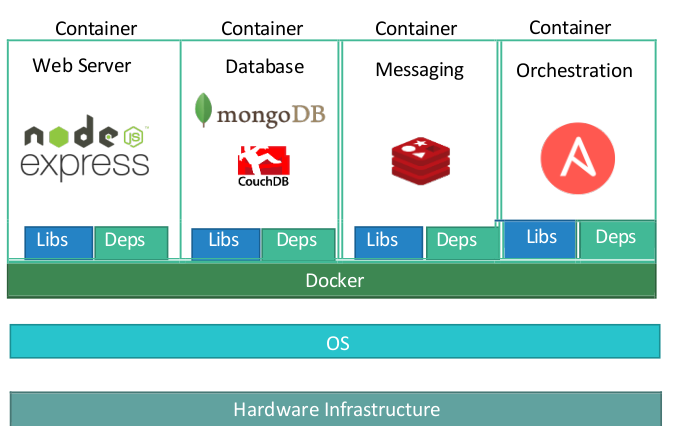
In this sense, containers provide isolated environments (resources, network) that share the OS kernel. This containers include the applications and all the necessary libraries and dependencies that it needs to run.
Applications that are containerized, are shipped with only additional software needed (on top the kernel). The container technology (e.g docker) acts as an interface between the containers and the host kernel.
This is the reason why Linux based containers cannot run in windows hosts and the other way around
Images
In the container context, an image is a package or a template. It can be stored in repositories online and shared and it is used to create one or more containers.
Containers vs VMs
Containers offer a lightweight alternative to traditional virtual machines, but in turn, provide less isolation.
| Container | VMs |
|---|---|
| Share the underlying OS, don’t have to create one every time | Each VM has its own OS |
| Can only run if host has similar tech | Any VM can run on any host |
| OS Sharing means is only partially isolated from other containers | Totally isolated from other VMs |
| Faster to spin up, lighter | Heavier and slower |
Runtimes and CRI
The most used container runtime (software to create and manage containers) is Docker. This technology is not a single component but instead a stack.
In this stack, docker provide a lot of “helpful” components on top of of a “lower level” container runtime: containerd
CRI and Kubernetes docker support
In order to interact with container runtimes, K8s asks them to implement the CRI (Container Runtime Interface). With this, the kubelet agent can seamlessly communicate with the runtimes.
Docker does not implement the CRI, as its main use case was always “human” users. For this reason, kubernetes implemented an additional component called dockershim that (rather dirtily) allowed interface with docker. However, from versions 1.24 onwards support for dockershim was removed.
containerd however implements this interface (as well as other engines like cri-o or rkt). This means that containerd is used as a drop in replacement for docker in modern kubernetes deployments.
Containerd
As explained above, this is a runtime that is used by docker in the backend. However, it can be installed and used on its own. For this different tools exists:
ctr: Is a cli tool included withcontainerd. Its is not meant for heavy use, and its is not user friendlynerdctl: Is a cli tool that most of the times can be used as drop-in replacement for thedockercommandcrictl: Is a k8s developed CLI tool that allows to interact and manage all CRI compliant runtimes. This allows to inspect and monitor but it is not recommended for creating containers