LVM
LVM (Logical Volume Manager) is a linux tool that allows to group physical disks (also partitions) into groups. From these groups (as a pool), logical volumes can be carved out to use in the system.
This layer of abstraction has the main advantage of making the logical volumes very easy to dynamically extend (as long as the supporting volume group has enough space)
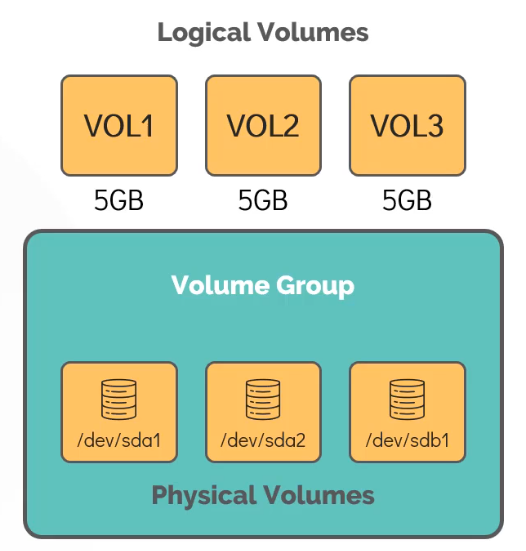
Creating a Logical volume
Following the LVM hierarchy, first a PV (Physical Volume) object must be created for each physical device. This maps the device so that LVM can manage it
pvcreate /dev/sdb
pvdisplay # Show all PVs
Then, a volume group can be created which contains the desired PVs:
vgcreate vg_name /dev/sdb ...
vgdisplay # Show all VGs
Finally a logical volume can be carved out the volume group:
lvcreate -L 1G -n vol1 vg_name # Create a linear 1G logical volume
lvdisplay
mkfs.ext4 /dev/vg_name/vol1` # A FS can be created and then mounted (mount,fstab)
Resizing
Fist,check the volume groups to check that there is enough space
vgsThen resize (without unmounting)
lvresize -L +1G -n /dev/vg_name/vol1 # Add 1g MORE
resize2fs /dev/vg_name/vol1