System Startup
The boot process
In linux, the boot process occurs when initiating the system. It goes from the moment the computer is powered on until the UI is fully operational and ready.
This is a sequential Process
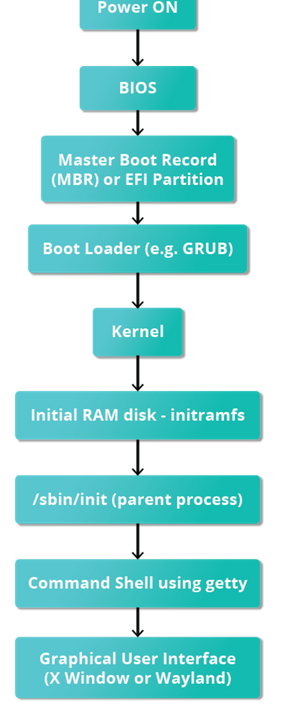
1. BIOS
- Basic Input Output System
- Initializes the hardware (including monitor and keyboard)
- Tests the main memory (Power On Self Test)
- Normally installed in a ROM in the motherboard
2. Boot Loader
- First Stage:
- In Old systems: The BIOS looks for executable boot code in a certain part of the disk (Master Boot Record (MBR)). This code examines the partition table and finds a bootable partition. Also finds a second-stage bootloader (e.g. GRUB) and loads in into RAM
- In New Systems (UEFI): UEFI Firmware reads boot entries (Information about where is which os, where in the EFI partition is the bootloader). It also finds the bootloader and starts it.
- Second Stage: Programs like GRUB allow to choose the OS. Once decided, it loads the kernel and the initial RAM disks (in RAM) and passes control to the kernel. (Kernel first job is to decompress itself)
- Second stage bootloaders are located in
/boot - Some second-stage bootloaders are GRUB (for GRand Unified Boot loader), ISOLINUX (for booting from removable media), and DAS U-Boot (for booting on embedded devices/appliances)
- Second stage bootloaders are located in
3. Kernel initialization and initial RAM Disk initramfs
- When the kernel is loaded in RAM, it initializes and configures the computer’s memory and also configures all the hardware attached to the system.
- The filesystem contains programs and binary files that perform all actions needed to mount the proper root filesystem
- After the root filesystem has been found, it is checked for errors and mounted.
- At boot time, the boot loader loads the kernel and the initramfs image into memory and starts the kernel. The kernel checks for the presence of the initramfs and, if found, mounts it as
/and runs/sbin/init.
4. /sbin/init
- It handles the mounting and pivoting over to the final real root filesystem.
- Is the parent process of nearly all processes
- Set ups processes and networking, mounts filesystems, etc.
- Keeps the system running (Managing other processes, cleaning up after them, etc)
- Shut down cleanly
Most distributions have a link from /sbin/init to systemd
SystemD Targets (former Runlevels)
When initializing the system, systemd defines a set of services that need to run so that the system is considered ready. However, this is not a fix set and it depends on the “mode” one wants to initialize the system in.
The following “modes” (or targets in systemd) are common:
multi-user.target: Start the system into non GUI (terminal) inputgraphical.target: Start the system into GUI input
Targets provide a way to declare service and other target dependencies. There a several targets defined in the systemd documentation
To see the default target in a system:
systemctl get-defaultTO change it:
systemctl set-default multi-user.target