Terraform Cloud
Terraform Cloud is a SaaS offering that provides remote state storage, version control integration, and additional features for teams to collaborate on changes to infrastructure.
- Its free tier is limited to 5 users and 3 concurrent runs.
- State files are stored in a private bucket on S3.
- Terraform scripts run in a containerized environment. This means that variable definitions are done directly in the UI and not in a separate file.
- Cost estimation is available for AWS, Azure, and GCP. Sentinel policies can be added to make sure that deployments are compliant with company budget policies.
A
.terraformignorefile can be used to ignore files and directories when uploading to Terraform Cloud. If not present, Terraform will ignore the.terraformand.gitdirectories by default.
Basic Terminology
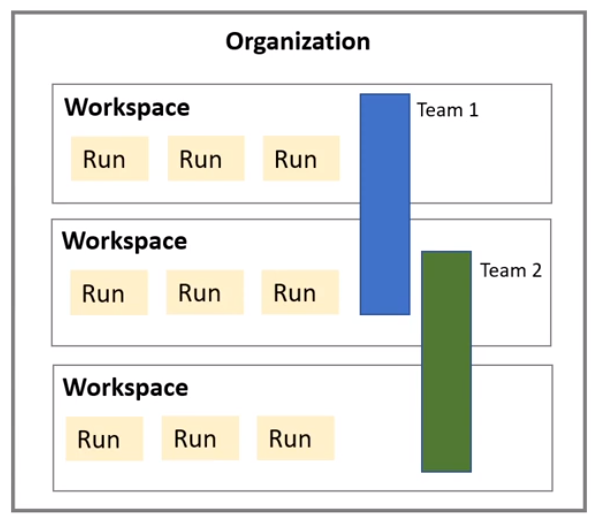
- Organization: A collection of workspaces and users. Each organization has one or more owners which can manage the organization and its workspaces.
- Workspace: Represents a unique environment or stack. Allow for more granular permissions including run level permissions (read runs, apply runs, destroy runs, etc). Can run different versions of Terraform.
- Team: A group of users that share access to workspaces.
- Run: A single execution of Terraform (operating on an execution plan).Can be initiated manually or automatically (via webhook, API, or VCS integration).
Workflows
Terraform cloud supports 3 different ways to work with Terraform projects:
- CLI-driven workflow: Terraform CLI is used to create and manage infrastructure. State is stored remotely in Terraform Cloud.
- VCS-driven workflow: Terraform cloud is integrated with a VCS provider (GitHub, GitLab, Bitbucket). Merge request trigger plan runs and merges to master trigger apply runs.
- API-driven workflow: Runs are triggered via an API call. This is useful for integrating Terraform with other tools.
API Tokens
API tokens are used to authenticate with Terraform Cloud. They can be created programmatically, via the UI, or via the CLI.
There are three types of tokens:
- User token: Used to authenticate as a user. Has the same permissions as the user who created it.
- Team token: Used to authenticate as a team. Has the same permissions as the team that created it. Only one team token can be active at a time.
- Organization token: Used to authenticate as an organization. Only recommended for workspace and team provisioning. Has permissions to manage all workspaces and teams in the organization.
Migrating from local state to remote state
- Create a new workspace in Terraform Cloud
- Add the remote backend configuration to the terraform block:
cloud {
    organization = "TestJPOrg"
    workspaces {
      name = "test-wp"
    }
}- Run
terraform initto initialize the backend
Private Module Registry
Terraform Cloud provides a private module registry that can be used to store and share modules across an organization. Modules can be uploaded via the UI or via the API.
This allows to have modules always available and up to date for all users in the organization. It also includes some extra features like versioning, configuration designer, and documentation.
Cloud agents
- Similar to gitlab runners. It allows self managed machines to pull and run terraform runs.
- Also available as a docker container
Sentinel
Sentinel is a policy as code framework that allows to define policies to enforce compliance and security requirements. It is integrated with Terraform Cloud and can be used to enforce policies on Terraform runs.
Policies are defined and treated as code. They are written in the Sentinel language and can be versioned and stored in a VCS repository.
Terraform cloud can automatically integrate policies from a VCS repository. This allows to have a single source of truth for policies and to have them versioned and auditable. These can then be applied to workspaces and runs.